Project · Clipstack
Everything you copied, still on your Mac.
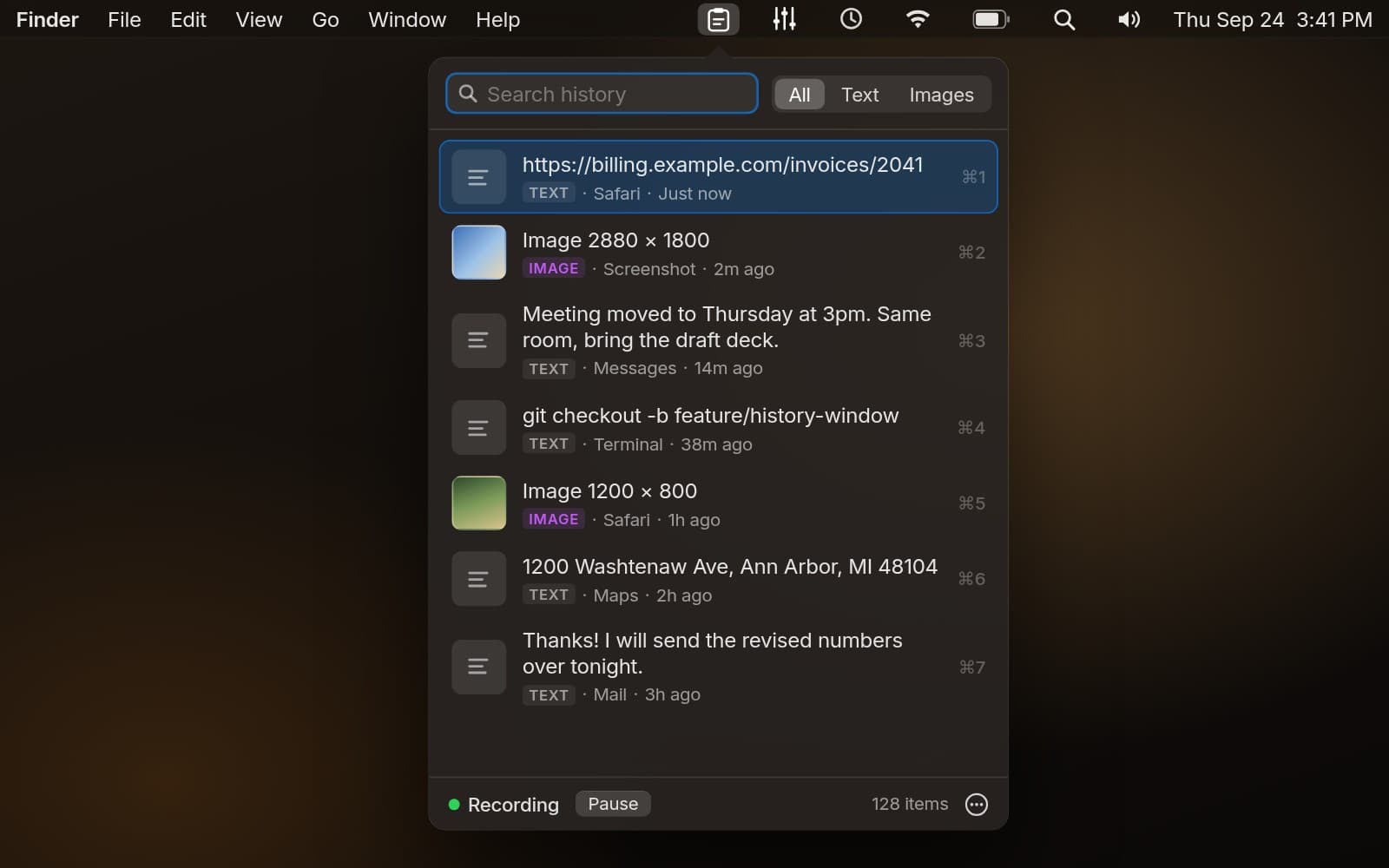
Clipstack is a menu-bar clipboard history for macOS. It quietly keeps the text and images you copy, lets you search them, and puts any of them back on the clipboard. No accounts, no sync, no network access.
Role
Product design, SwiftUI, AppKit
Stack
Swift · SwiftUI · SwiftPM · App Sandbox
Platform
macOS 14 Sonoma and later
Status
Open source
Clipboard managers ask for a lot of trust. This one asks for almost none.
Your clipboard holds passwords, addresses, and half-written messages. I wanted history without handing any of that to a server or granting Accessibility access, so every decision starts from keeping it small and local.
Keyboard first
Open it and start typing. Arrow keys move, Return copies, and Cmd 1-9 grabs one of the first nine items without touching the mouse.
Stays local
History lives in a sandboxed folder on your Mac. There is no account, sync, telemetry, or network code to trust.
No Accessibility permission
Clipstack only puts items back on the clipboard. You press Cmd V yourself, so it never needs to simulate keystrokes.
Privacy you can see
Pause capture in one click with the state always visible, exclude apps, set retention, and delete one item or everything.